
Ch.19: Elastic Net Regression
Inspired by: YouTube
Across Ch.13 through Ch.18, Ridge and Lasso came out as two different tools for two different situations. Ridge shrinks every coefficient toward zero but never all the way there: use it when every input column genuinely matters and none should be dropped. Lasso drives some coefficients to exactly zero as lambda grows, giving built-in feature selection: use it when only a subset of columns are actually important. Elastic Net exists for a third, more common situation: a dataset with so many columns (say 100 or more) that nobody can reasonably decide in advance which of those two situations applies.
1. One Loss Function, Two Penalties
Elastic Net's loss just adds both penalty terms to the same MSE:
Here is the L2 (Ridge) weight and is the L1 (Lasso) weight. Set and this is exactly Ridge. Set and this is exactly Lasso. Set both nonzero and the model gets some of each: some shrinkage on every coefficient (from the term) and some coefficients pushed all the way to exactly zero (from the term), with the balance between the two controlled by how and compare to each other.
A quick note on the video's notation: the video labels the two weights "a" and "b" but reverses their roles at different points in the explanation. This post uses for the L1 (Lasso) weight and for the L2 (Ridge) weight throughout, to match scikit-learn's convention.
2. Scikit-Learn's Parameterization: α and l1_ratio
sklearn.linear_model.ElasticNet doesn't expose a and b directly. Instead it uses two different hyperparameters:
is the total regularization strength, both penalties combined. l1_ratio is the fraction of that total going to L1 (Lasso), a number between 0 and 1. The defaults are and l1_ratio=0.5. With two equations and two unknowns this gives and : equal Ridge and equal Lasso by default.
Recovering and from and l1_ratio is just algebra. The video derives it as: and , where the video's maps to our (the L1 weight) and the video's maps to our (the L2 weight), with . In plain terms:
So the L1 penalty weight is and the L2 penalty weight is . Turning l1_ratio up toward 1 shifts weight onto the L1 term, more feature selection, sparser coefficients. Turning it down toward 0 shifts weight onto the L2 term, smoother shrinkage, nothing pushed to exact zero. Note that scikit-learn internally halves the L2 term and scales the squared errors by , which affects the exact coefficient values but not the conceptual behavior described here.
One slip worth catching from the video: when l1_ratio=0.9 the video says "90% Ridge, giving more weightage to Ridge." That is backwards. With scikit-learn's definition, l1_ratio=0.9 means 90% L1 and 10% L2, so the model is mostly Lasso at that setting.
3. Trying All Four on the Diabetes Dataset
The following code is from the source notebook:
from sklearn.datasets import load_diabetes
from sklearn.linear_model import LinearRegression, Ridge, Lasso, ElasticNet
from sklearn.model_selection import train_test_split
from sklearn.metrics import r2_score

X, y = load_diabetes(return_X_y=True)
X_train, X_test, y_train, y_test = train_test_split(X, y, test_size=0.2, random_state=2)

reg = LinearRegression()
reg.fit(X_train, y_train)
print(r2_score(y_test, reg.predict(X_test)))
# 0.4399

reg = Ridge(alpha=0.1)
reg.fit(X_train, y_train)
print(r2_score(y_test, reg.predict(X_test)))
# 0.4520

reg = Lasso(alpha=0.01)
reg.fit(X_train, y_train)
print(r2_score(y_test, reg.predict(X_test)))
# 0.4411

reg = ElasticNet(alpha=0.005, l1_ratio=0.9)
reg.fit(X_train, y_train)
print(r2_score(y_test, reg.predict(X_test)))
# 0.4531
Plain linear regression starts at 0.4399. Ridge with does a little better at 0.4520; several values were tried and 0.1 gave the best result. Lasso with barely edges out plain linear at 0.4411, and Ridge slightly beats Lasso here. ElasticNet with and l1_ratio=0.9 (mostly L1, with a small L2 component mixed in) comes out on top at 0.4531, a slight improvement over Ridge alone. This isn't a universal ranking: each model's was hand-picked rather than cross-validated, and results will vary by dataset. The point is that with two hyperparameters instead of one, Elastic Net has strictly more room to search for a good fit than either Ridge or Lasso alone.
Ridge only ever sees the back edge of that surface (l1_ratio = 0) and Lasso only the front edge (l1_ratio = 1). Elastic Net is free to land anywhere on the sheet, and on this dataset the high ground is a broad plateau at small that runs across the middle l1_ratio values rather than sitting at either edge.
4. What Changes as l1_ratio Moves From 0 to 1
Sweeping l1_ratio at a fixed shows the transition between Ridge-like and Lasso-like behavior directly:
import numpy as np

l1_ratios = np.linspace(0.01, 1, 60)
nonzero_counts = []
for r in l1_ratios:
    m = ElasticNet(alpha=0.1, l1_ratio=r)
    m.fit(X_train, y_train)
    nonzero_counts.append(np.sum(np.abs(m.coef_) > 1e-8))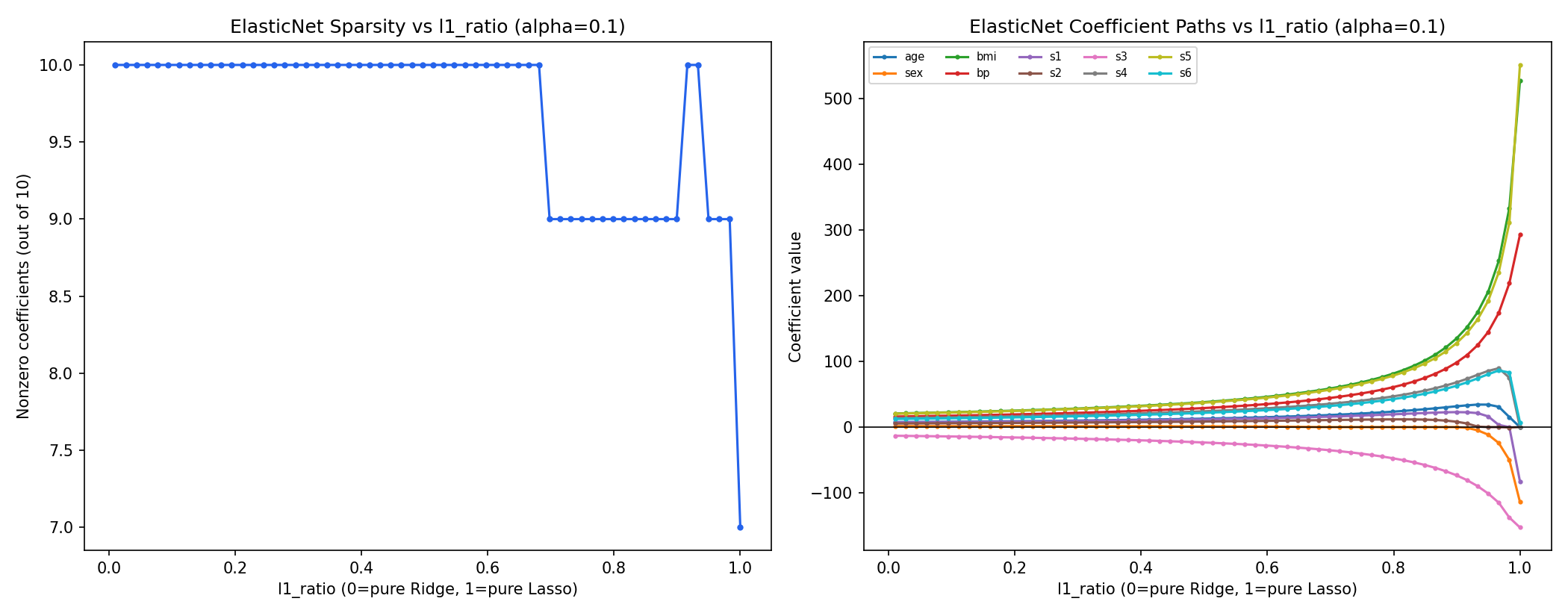
For most of the range, all 10 coefficients stay nonzero; only near l1_ratio=1 (pure Lasso) does the count drop to 7, three columns finally zeroed out. The right panel explains why the coefficients themselves barely move for most of the sweep, then shoot away from zero near the right edge: is the combined budget, so as l1_ratio climbs, the L2 share shrinks toward nothing while the L1 share stays comparatively small. Near l1_ratio=1 almost the entire, fairly gentle, penalty budget is L1 alone, a much weaker constraint than the combined penalty was in the middle of the sweep, so the coefficients that survive suddenly have far more freedom to grow. Sparsity from L1 and strength of shrinkage from the total budget move somewhat independently of each other, which is exactly why sweeping l1_ratio alone doesn't produce a smooth, monotonic transition.
5. When to Reach for Elastic Net
Two situations from the video are worth calling out specifically:
Large, unfamiliar feature sets. With a handful of columns it's usually possible to reason about which ones matter. With dozens or hundreds of columns, much less so, and manually deciding "Ridge, because everything matters" or "Lasso, because most of this is noise" stops being a call anyone can make confidently. Elastic Net sidesteps the decision: tune l1_ratio (alongside ) with cross-validation and let the data settle how much feature selection actually helps.
Multicollinearity. When input columns are strongly correlated with each other, the video uses height and weight as the example (when height increases, weight tends to increase too), Lasso's behavior gets erratic. It tends to arbitrarily keep one of a correlated pair and zero out the other, even when both carry real signal. Ridge handles correlated features more gracefully, spreading weight across them instead of picking one. Elastic Net, with its L2 component still present, inherits some of that same stability while keeping Lasso's ability to drop genuinely useless columns.
6. Two Ways to Fit It in Scikit-Learn
from sklearn.linear_model import ElasticNet

reg = ElasticNet(alpha=0.1, l1_ratio=0.5)
from sklearn.linear_model import SGDRegressor
reg = SGDRegressor(penalty='elasticnet', alpha=0.1, l1_ratio=0.5)Both fit the same model in principle. ElasticNet uses coordinate descent, the same closed-form-per-coordinate approach Lasso relies on since it lacks a clean single closed-form solution (Ch.18), while SGDRegressor reaches an approximate answer through stochastic gradient steps. The dedicated ElasticNet class is generally the better default: it is more optimized and specifically built for this task, converging to a more precise answer without the extra learning-rate tuning that comes with an SGD-based estimator.
Ridge, Lasso, and Elastic Net all modify the same base loss function with a different regularization term, and picking between them comes down to one question: is it already known which features matter? Yes, every feature matters: Ridge. Yes, only some do: Lasso. Not sure: Elastic Net, and let cross-validation over and l1_ratio work it out.
As a practical exercise, go to Kaggle, pick a higher-dimensional dataset with 50 or more columns, apply Ridge, Lasso, and Elastic Net to it, and document your observations. Does Elastic Net genuinely outperform the other two on a larger feature set? The answer will depend on the dataset, and that hands-on comparison is a good way to build intuition for when each regularizer earns its keep.
That closes out this blog's tour of linear regression's regularization techniques. Next up is logistic regression.