
Ch.69: DBSCAN Clustering
Inspired by: YouTube
The agglomerative clustering post fixed one of K-means' problems, rigid spherical clusters, by merging points bottom-up instead of circling a centroid. It paid for that with an proximity matrix that stops being usable past a few tens of thousands of points. DBSCAN takes a completely different route to the same goal: instead of distance to a center or a pairwise merge history, it clusters by density.
1. Why K-Means Needs a Replacement
Three separate problems, all stemming from the same root cause:
- You have to specify the number of clusters up front. For low-dimensional data you can eyeball it; for 10-dimensional data you can't plot it, and the elbow method's curve is often too ambiguous to read a clean answer off of.
- K-means is sensitive to outliers. Every centroid is the mean position of its assigned points, so a single far-away point drags its centroid away from where the cluster actually is, distorting every other point's assignment in that cluster.
- K-means is a centroid-based algorithm, meaning its entire mechanism, assign to nearest centroid, recompute centroid, repeat, is built around minimizing distance to a center. Hand it non-spherical data and it fails structurally, not just by bad luck: the shape itself is incompatible with "distance to a single point" as a clustering rule.
These three reasons are why a second family of clustering algorithms exists: density-based clustering, where a cluster isn't "points near a center" but "a region where points are packed closely together." DBSCAN, density based spatial clustering of applications with noise, is the standard example; OPTICS is another.
The core intuition: take a dataset that visibly separates into two groups, a dense region, a sparser gap, and another dense region. A density-based algorithm doesn't need to know there are "two clusters" in advance, it just needs to notice that the sparse gap is a natural place to cut.
2. The Two Hyperparameters: Epsilon and MinPoints
DBSCAN needs exactly two hyperparameters to turn "density" into something computable for any individual point:
- (epsilon): a radius. Draw a circle of this radius around a point, and everything inside it is that point's epsilon neighborhood.
- MinPoints: a count. If a point's epsilon neighborhood contains at least this many points, that region counts as dense.
Concretely: pick a point, draw a circle of radius around it, count how many data points fall inside. If that count is MinPoints, the point sits in a dense region. If not, it sits in a sparse one. Do this for every point in the dataset and you've turned "density" into a per-point, checkable property, which is exactly what the rest of the algorithm builds on.
3. Core, Border, and Noise Points
Every point in the dataset gets classified into exactly one of three types, based entirely on its epsilon neighborhood:
- Core point: a point whose epsilon neighborhood contains MinPoints data points (counting the point itself). These are the points that make up the dense interior of a cluster.
- Border point: a point whose epsilon neighborhood contains fewer than MinPoints points, but whose neighborhood includes at least one core point. It's not dense enough to anchor a cluster on its own, but it's close enough to one to belong to it.
- Noise point: a point that's neither core nor border, too sparse to be core, and not adjacent to any core point either.
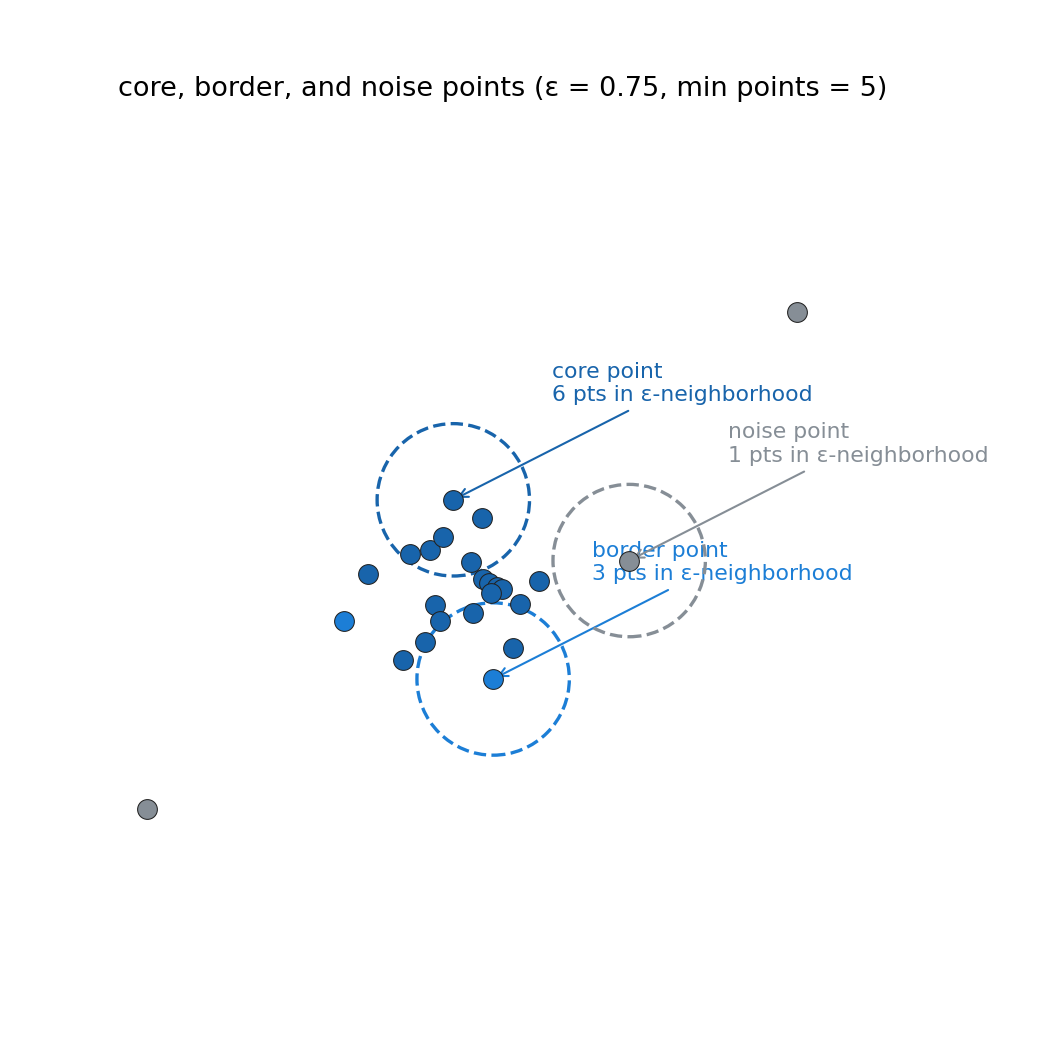
In a real dataset, this categorization has a clean geometric reading: core points form the interior pattern of each cluster, border points sit at the periphery, and noise points are the stray outliers sitting away from everything.
4. Density-Connected Points
One more concept before the algorithm itself: two points and are density-connected if they can be linked through a chain of core points, where every adjacent pair in that chain is within distance of each other. If and are density-connected, they belong in the same cluster.
The chain breaks under two conditions:
- Any point in the middle of the chain is a border or noise point rather than a core point, that link in the chain simply doesn't connect.
- Two adjacent points in the chain, even if both are core points, are farther apart than .
Either failure means and are not density-connected, and they end up in separate clusters (or one of them ends up as noise).
5. The Algorithm, in Four Steps
With MinPoints and chosen as hyperparameters:
Step 1. Classify every point in the dataset as core, border, or noise, using the epsilon-neighborhood rule from Section 3.
Step 2. For every unclustered core point: start a new cluster, then repeatedly pull in every unclustered point that is density-connected to anything already in the cluster. Keep expanding until no more density-connected core points remain, then move to the next unclustered core point and start another new cluster the same way.
Step 3. For every unclustered border point: assign it to the cluster of its nearest core point.
Step 4. Leave every noise point unclustered.
That's the entire algorithm. A real run on a toy two-crescent dataset, with some scattered points added as deliberate noise, shows exactly this in action:
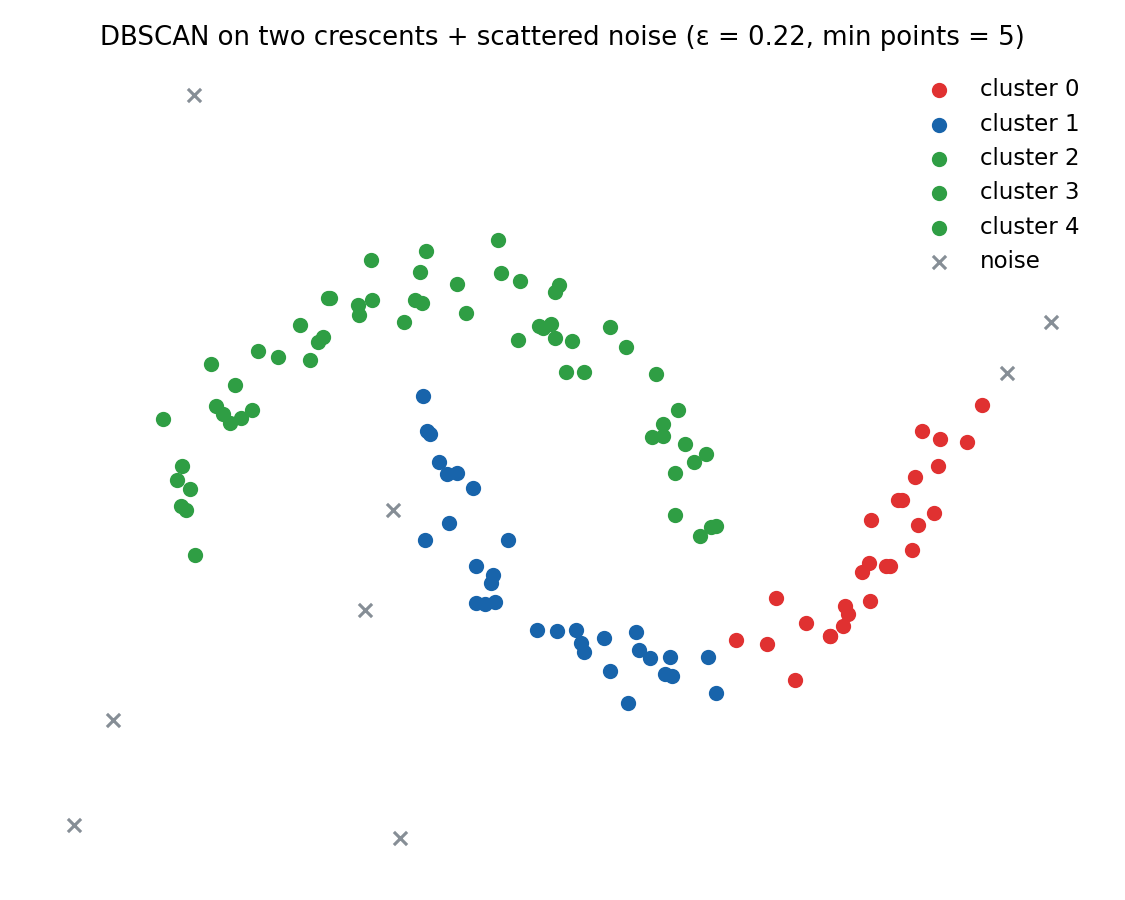
This result is itself a useful warning, not a clean success: with and MinPoints , each crescent splits into several smaller clusters (visible as separate colors along the same arc) instead of staying as one. That's not a bug, it's being a touch too small for how the points happen to be spaced along the crescent, so a few short gaps in point density read as cluster boundaries that weren't meant to be there. This is the exact failure mode Section 8 covers: a single global doesn't always suit every region of a dataset equally well.
6. DBSCAN in scikit-learn
Scikit-learn's own reference example for DBSCAN is six points, deliberately chosen so the three categories (core, border, noise) all show up:
from sklearn.cluster import DBSCAN
import numpy as np

X = np.array([[1, 2], [2, 2], [2, 3],
              [8, 7], [8, 8], [25, 80]])

clustering = DBSCAN(eps=3, min_samples=2).fit(X)
clustering.labels_
# array([ 0,  0,  0,  1,  1, -1])
Two hyperparameters go in, eps and min_samples, matching epsilon and MinPoints exactly. After fitting, labels_ holds the result: the first three points form cluster 0, the next two form cluster 1, and the last point, far away at (25, 80), gets labeled -1, scikit-learn's convention for noise.
Varying either hyperparameter on this same dataset makes the dense-region intuition concrete:
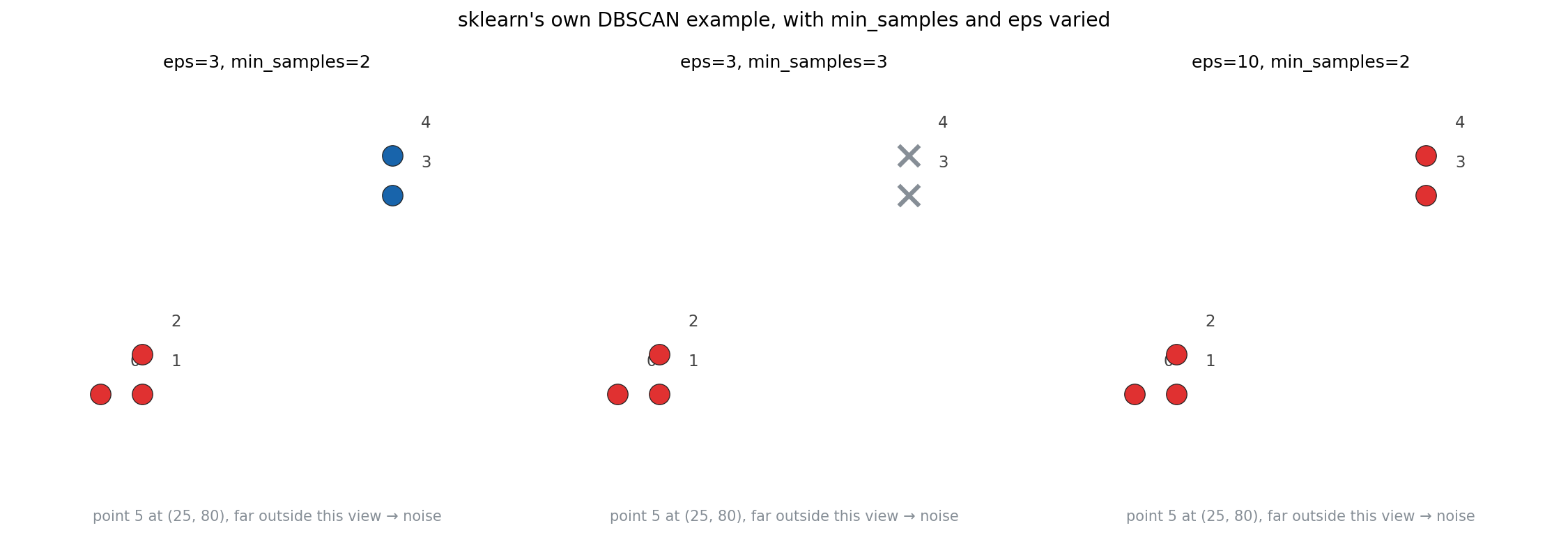
Raising min_samples from 2 to 3 turns points 3 and 4 from a valid cluster into noise: with only two points nearby, neither one's epsilon neighborhood reaches the new, stricter threshold of 3. Raising eps from 3 to 10 instead, keeping min_samples at 2, merges points 0 through 4 into a single cluster: a bigger radius means a bigger neighborhood, and at eps=10 point 4's neighborhood reaches all the way to point 0. Point 5 stays noise throughout every configuration shown here, it's placed at (25, 80), far enough from the rest of the data that no realistic radius pulls it in.
7. Where DBSCAN Actually Wins: Concentric Circles
The clearest demonstration of why density-based clustering exists is a dataset K-means structurally cannot handle: two concentric rings of points.
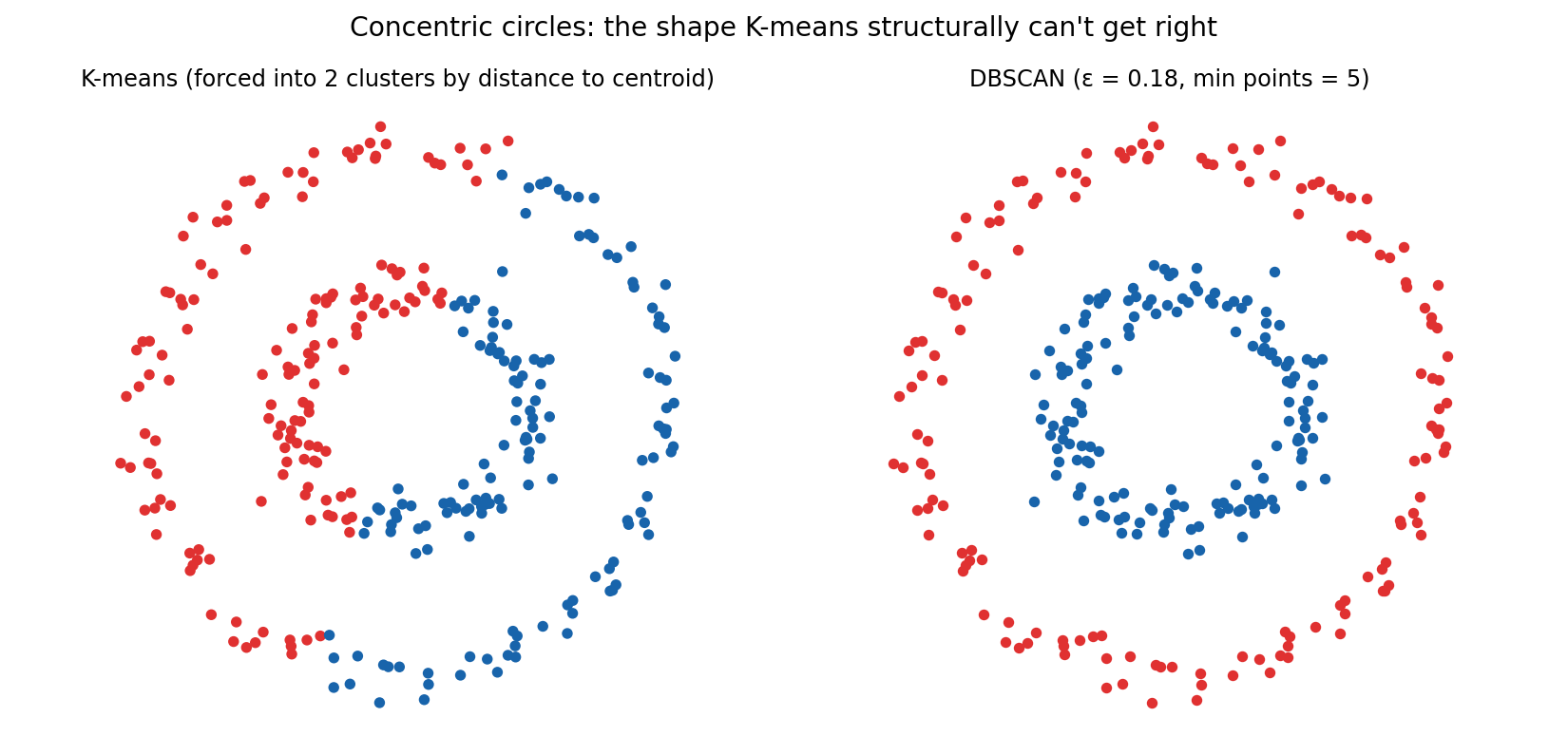
K-means, asked for 2 clusters, does what it always does: minimizes distance to two centroids. Since both centroids land near the shared center of the rings, the only thing K-means can do is slice the data roughly in half, mixing inner- and outer-ring points together on each side. DBSCAN never looks at a centroid at all. It only asks, locally, "how many points are near this point," and since each ring is internally dense while the gap between rings is sparse, the two rings naturally separate into two clusters with the gap acting as the boundary. No amount of retrying or reseeding fixes K-means here. It's the wrong tool for this shape, structurally, exactly as Section 1 described.
8. Try It Yourself
Every static chart above is one snapshot of and MinPoints. The fastest way to actually build intuition for how those two numbers interact is to vary them live and watch clusters merge, split, and shed noise in real time, the same idea the video closes on with a visualization tool for exploring DBSCAN. Here's a version of that same idea, running directly on this page:
Click empty space to add a point, click an existing point to remove it. Hit Run to watch the walk, or drag the sliders for an instant live result.
Click to drop your own points, or start from a preset. Drag up and watch separate clusters merge once their neighborhoods start overlapping; drag it down and watch a single cluster fracture along its sparsest stretch, exactly what happened to the crescents in Section 5. Raise MinPoints and previously-core points along a cluster's thin edges demote to noise, since the same neighborhood that was "dense enough" a moment ago no longer clears the stricter bar.
9. Advantages and Limitations
Advantages:
- Robust to outliers. Noise detection is built into the algorithm itself, not bolted on afterward, which makes DBSCAN usable directly for anomaly detection in some settings.
- No need to specify the number of clusters. The algorithm discovers how many dense regions exist on its own, unlike K-means where has to be chosen in advance (often by elbow-method guesswork).
- Finds arbitrarily shaped clusters. Since the whole mechanism runs on density rather than distance-to-centroid, shape doesn't matter: circles, crescents, elongated streaks, DBSCAN doesn't care, only density does.
- Just two hyperparameters to remember, and MinPoints, versus having to carry around more moving parts for some other algorithms.
Limitations:
- A single global doesn't suit clusters of different densities. Give DBSCAN two clusters, one sparse and spread out, one tight and tightly packed, and one
epsvalue has to work for both simultaneously. Anepstuned for the sparse cluster over-merges the dense one; anepstuned for the dense cluster shreds the sparse one into noise. The moons example in Section 5 is a small version of exactly this problem. - No prediction for new points. DBSCAN has no
predictthe way K-means does: there's no centroid to compare a new point against. Placing a new point means rerunning the entire clustering from scratch, there's no incremental way to ask "which existing cluster does this new point belong to."
10. What to Take Away
- DBSCAN replaces K-means' "distance to a centroid" with "density of nearby points," fixing K-means' three core weaknesses: no need to specify cluster count up front, resistance to outliers, and the ability to find non-spherical clusters.
- Everything rests on two hyperparameters: , a neighborhood radius, and MinPoints, the neighbor count that makes a neighborhood "dense."
- Every point is classified as core (dense neighborhood), border (sparse neighborhood, but adjacent to a core point), or noise (neither).
- The algorithm itself is four steps: classify every point, grow a new cluster from each unclustered core point by following density-connected chains, attach border points to their nearest core point's cluster, and leave noise points alone.
- The real cost is a single global : it can't simultaneously suit clusters of very different densities, and DBSCAN offers no way to classify a brand-new point without rerunning the whole algorithm.