
Ch.67: K-Means in Python, Clustering Students by CGPA and IQ
Inspired by: YouTube
1. The Dataset: 200 Students, Two Numbers Each
The previous post built K-means up geometrically: assign every point to its nearest centroid, move each centroid to the mean of its points, repeat until nothing changes, and pick from the elbow of a WCSS curve. This post runs that whole workflow in scikit-learn on a small but realistic-shaped problem.
The data is a college's record of 200 students, with exactly two columns: each student's CGPA and their IQ. There's no label column, no "this student belongs to group 2." The goal is to let K-means discover which kinds of students exist, so that, say, the college's training and placement cell can prepare each kind differently. The code below follows the source notebook and its student_clustering.csv.
import numpy as np
import pandas as pd
import matplotlib.pyplot as plt

df = pd.read_csv('student_clustering.csv')
print("The shape of data is", df.shape)
df.head()
The shape of data is (200, 2)
cgpa iq
0 5.13 88
1 5.90 113
2 8.36 93
3 8.27 97
4 5.45 110
Before running any algorithm, plot it:
plt.scatter(df['cgpa'], df['iq'])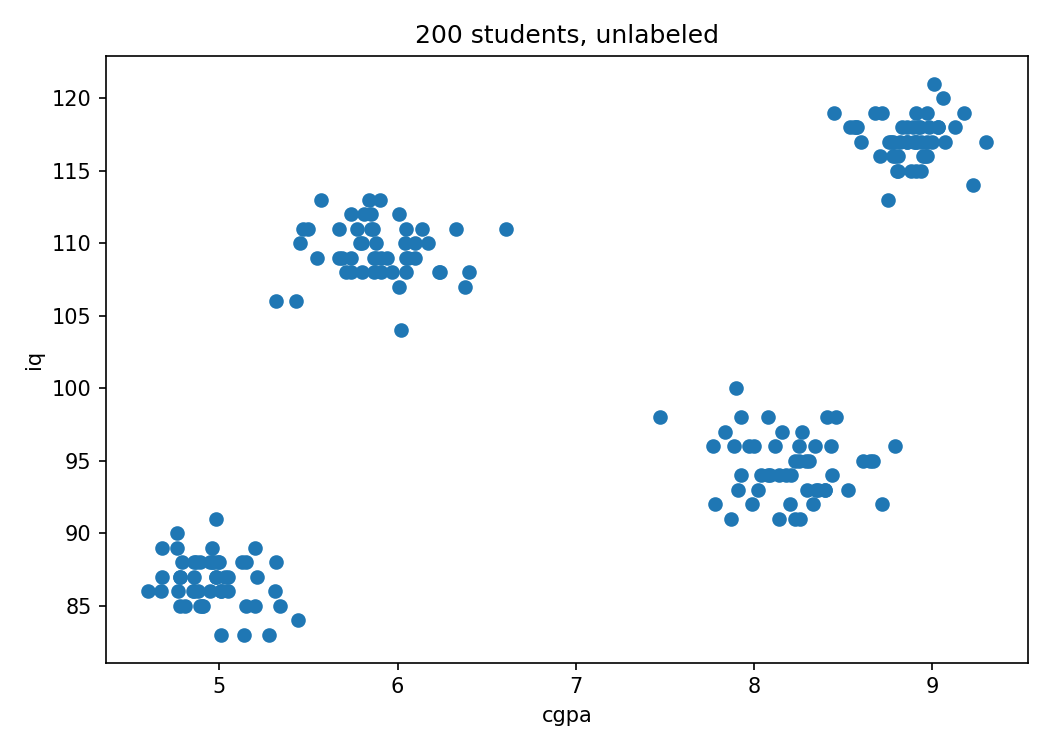
Four groups are obvious to the eye. That's because this dataset was generated, not collected: real student data would have much fuzzier boundaries, with plenty of students sitting between groups. The clean version is useful precisely because it gives a known right answer to check K-means against. If the algorithm can't recover four groups here, something is wrong with how it's being used.
2. Picking K With the Elbow Method
Eyeballing works in two dimensions. It stops working the moment there's a third feature, so it's worth confirming that the elbow method reaches the same answer on its own. The recipe from the previous post translates almost line for line:
from sklearn.cluster import KMeans

wcss = []

for i in range(1, 11):
    km = KMeans(n_clusters=i, random_state=42)
    km.fit_predict(df)
    wcss.append(km.inertia_)
Train a K-means model for every from 1 to 10 and record its WCSS each time. scikit-learn doesn't call it WCSS: after fitting, the model exposes the same quantity, the sum of squared distances from every point to its own cluster's centroid, as the attribute inertia_. The whole DataFrame goes in as input, since both of its columns are features and there's no target to drop.
One deliberate change from the source notebook: random_state=42. K-means starts from randomly chosen centroids, so without a fixed seed, every run can number the clusters differently (and occasionally land in a slightly different solution). Fixing the seed makes every number and picture in this post reproducible; Section 5 shows why that matters more than it sounds.
plt.plot(range(1, 11), wcss)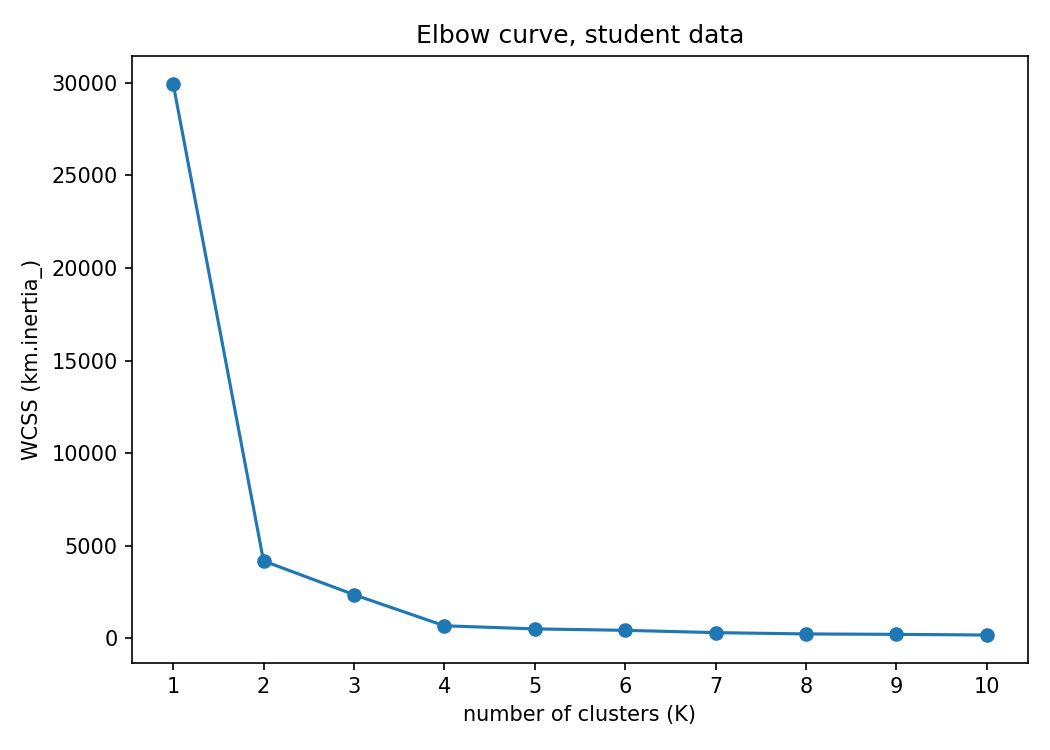
The actual values: 29,958 at ; 4,184 at ; 2,364 at ; 682 at ; then 514, 438, 312, 242, 220, 184 for through .
Notice that the biggest single drop is from to , so a careless read might call 2 the elbow. But the curve is still falling steeply after 2: going to 3 and then 4 cuts WCSS by another factor of six. Only after does it go flat, with each extra cluster buying barely anything (682 to 514, then to 438). The elbow is where the curve stops bending downward sharply, not where the largest drop happens, and here that's , matching what the scatter plot showed.
3. Training the Final Model
With settled, train one more model and keep its output this time:
X = df.iloc[:, :].values
km = KMeans(n_clusters=4, random_state=42)
y_means = km.fit_predict(X)
df.iloc[:, :].values takes every row and every column of the DataFrame and turns it into a plain NumPy array of shape (200, 2). The model doesn't need this (it accepted the DataFrame fine in the elbow loop), but a NumPy array makes the plotting step below easier, because it supports the row-and-column mask indexing that comes next.
fit_predict does both steps at once: it runs K-means to convergence, then returns the cluster number assigned to every row:
array([1, 0, 2, 2, 0, 0, 2, 3, 0, 2, 1, 0, 2, 1, 0, 2, 0, 2, 0, 0, ...])
So y_means[0] == 1 means the first student (CGPA 5.13, IQ 88) landed in cluster 1. Each of the four clusters ends up with exactly 50 students, which fits a dataset that was generated as four groups of 50.
4. Plotting Each Cluster
To color the scatter plot by cluster, each cluster's points need pulling out separately. Boolean masks do that:
X[y_means == 3, 1]array([115., 119., 117., 118., 118., 116., 116., 119., 116., 115., ...])
Read it in two parts. y_means == 3 produces an array of 200 True/False values, True wherever a student was assigned to cluster 3. Used as the row index, it keeps only those students' rows. The 1 after the comma picks column 1, the IQ. So this line means "the IQ of every student in cluster 3." Swap the 1 for a 0 and it gives their CGPAs instead.
That's exactly the pair of arrays plt.scatter needs for one cluster, so one call per cluster does the job:
plt.scatter(X[y_means == 0, 0], X[y_means == 0, 1], color='blue')
plt.scatter(X[y_means == 1, 0], X[y_means == 1, 1], color='red')
plt.scatter(X[y_means == 2, 0], X[y_means == 2, 1], color='green')
plt.scatter(X[y_means == 3, 0], X[y_means == 3, 1], color='yellow')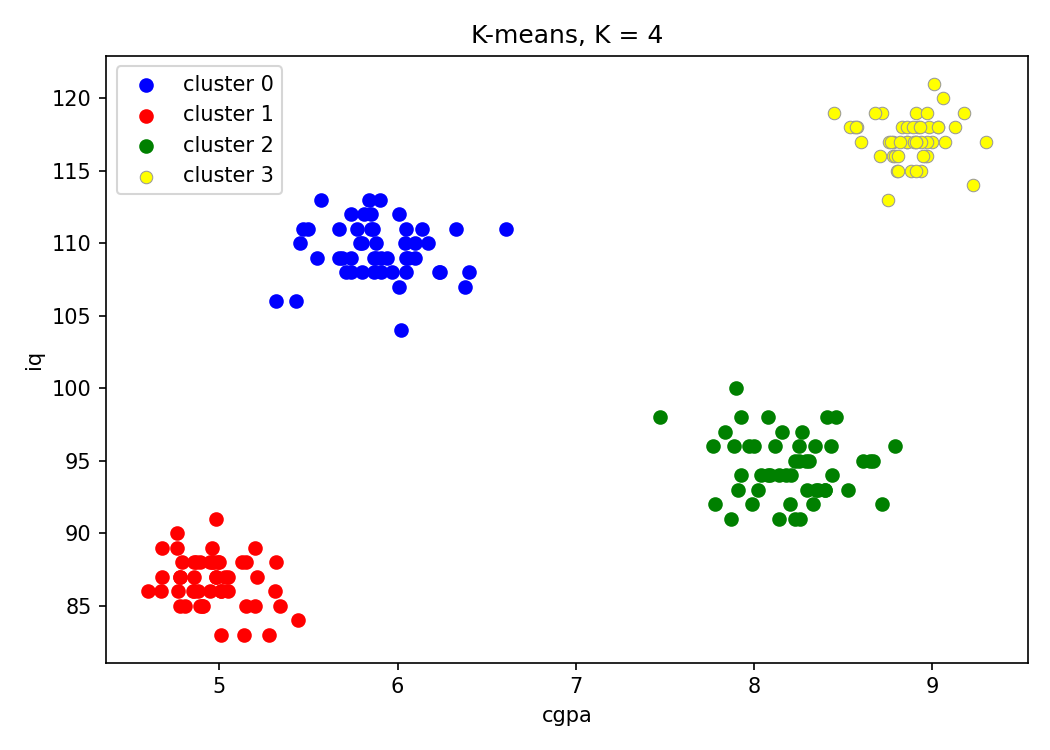
K-means recovered all four groups, with no student assigned to the "wrong" one by eye.
5. Turning Clusters Into a Plan
The algorithm's job ends at "these 50 students belong together." Saying what each group means is the analyst's job, and it's where clustering earns its keep. Reading the clusters off the chart and the fitted centroids (km.cluster_centers_):
| Cluster (color) | CGPA range | IQ range | Centroid | What kind of student | What the placement cell should do |
|---|---|---|---|---|---|
| 3 (yellow) | 8.5 to 9.3 | 113 to 121 | (8.87, 117.2) | Intelligent and hard-working | Very little guidance needed |
| 2 (green) | 7.5 to 8.8 | 91 to 100 | (8.20, 94.6) | Hard-working, IQ not especially high | Their effort is already paying off; support it |
| 0 (blue) | 5.3 to 6.6 | 104 to 113 | (5.89, 109.5) | Intelligent but underperforming | Motivation, not more teaching |
| 1 (red) | 4.6 to 5.4 | 83 to 91 | (4.97, 86.7) | Low CGPA and lower IQ | The most teaching and attention |
The same pattern applies anywhere: cluster customers to market to each group differently, cluster songs or movies to recommend similar ones, cluster images to group visually similar photos. The algorithm finds the groups; a person decides what to do with them.
One important caution: the cluster numbers and colors mean nothing on their own. "Cluster 3" isn't the top group because 3 is a high number; it's just the order this particular run happened to number its centroids in. Running the same model with different seeds finds the exact same four centroids every time but numbers them differently: with random_state=0, the high-CGPA, high-IQ group is cluster 0; with random_state=1, it's cluster 3; with random_state=4, it's cluster 1. A notebook that says "red is the top group" is describing one run, and re-running it without a fixed seed can silently swap the colors. Always interpret a cluster by its centroid and its members, never by its number.
6. A Quirk the Clean Picture Hides: Feature Scale
K-means measures closeness with plain Euclidean distance, and that distance treats one unit of CGPA the same as one unit of IQ. Those units aren't comparable. Across these 200 students, CGPA spans about 4.7 points (4.6 to 9.3), while IQ spans about 38 (83 to 121). A gap of 3 CGPA points, the difference between a struggling student and a top one, counts the same as a 3-point IQ difference, which is almost nothing.
The WCSS at makes this concrete. That 29,958 is just the total squared spread of the data around its overall mean, and splitting it by column gives 525 from CGPA and 29,433 from IQ. About 98% of everything K-means is trying to minimize comes from the IQ column. It's very nearly clustering on IQ alone, and running K-means on just the IQ column confirms it: it reproduces this post's clustering for 198 of the 200 students.
It still worked here because the four generated groups also happen to be separated along IQ (83 to 91, 91 to 100, 104 to 113, 113 to 121), so IQ alone almost gets them right, and CGPA settles the borderline cases. Standardizing both columns first (StandardScaler, so each has mean 0 and standard deviation 1) gives exactly the same four clusters on this dataset. On real data, where groups might differ mainly in the small-scale feature, skipping that scaling step would let the large-scale feature quietly decide everything. Scaling features before K-means is standard practice for exactly this reason.
7. The Same Code, in Three Dimensions
Most K-means demos stop at 2D because that's what a scatter plot can show. But nothing in the algorithm cares how many columns there are: distances and means work the same in any number of dimensions. To see that, generate a 3-feature dataset with make_blobs, which places points around specified centers:
from sklearn.datasets import make_blobs

centroids = [(-5, -5, 5), (5, 5, -5), (3.5, -2.5, 4), (-2.5, 2.5, -4)]
cluster_std = [1, 1, 1, 1]

X, y = make_blobs(n_samples=200, cluster_std=cluster_std, centers=centroids,
                  n_features=3, random_state=1)
200 points, 3 columns, scattered with standard deviation 1 around four hand-picked 3D centers. Plotted with Plotly (which, unlike matplotlib's static images, lets the 3D view be rotated):
import plotly.express as px
fig = px.scatter_3d(x=X[:, 0], y=X[:, 1], z=X[:, 2])
fig.show()
Rotating the raw cloud shows four separate blobs. Then the exact same elbow loop, this time over to :
wcss = []
for i in range(1, 21):
    km = KMeans(n_clusters=i, random_state=42)
    km.fit_predict(X)
    wcss.append(km.inertia_)

plt.plot(range(1, 21), wcss)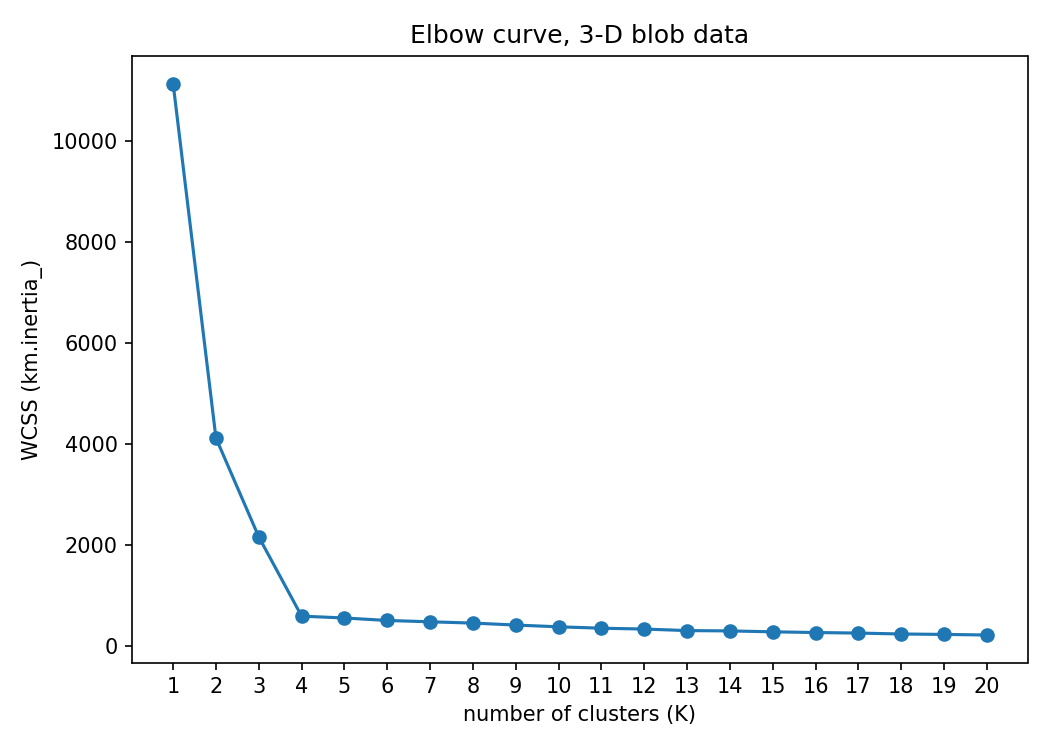
Same shape as before: 11,144, 4,122, 2,163, then 593 at , and a long, nearly flat tail after that (557 at , down to 220 at ). The elbow is at again. Then the final model, packing the result into a DataFrame for Plotly:
km = KMeans(n_clusters=4, random_state=42)
y_pred = km.fit_predict(X)

df = pd.DataFrame()
df['col1'] = X[:, 0]
df['col2'] = X[:, 1]
df['col3'] = X[:, 2]
df['label'] = y_pred

fig = px.scatter_3d(df, x='col1', y='col2', z='col3', color='label')
fig.show()
Here's that real output; drag to rotate, and switch between the raw points and the clustered result:
The fit is exact. The four learned centroids land at roughly (−4.98, −4.84, 5.03), (5.01, 5.02, −4.79), (3.50, −2.47, 4.07) and (−2.53, 2.75, −3.97), right on top of the four centers the data was generated from, and comparing y_pred against make_blobs's true group labels shows every one of the 200 points assigned to the right group (cluster numbers aside, per Section 5).
Not one line of the clustering code changed between 2D and 3D. The same would hold at 10 or 100 features. The only thing that breaks past three dimensions is the ability to look at the result, which is exactly why the elbow method matters: it picks from a single 2D curve regardless of how many features went into it.
8. What to Take Away
- The scikit-learn workflow is short: loop
KMeans(n_clusters=i)over a range of , recordkm.inertia_(scikit-learn's name for WCSS), pick the elbow, thenfit_predictonce with the chosen to get a cluster number per row. - The elbow is where the WCSS curve flattens out, not where its single biggest drop is. On the student data the biggest drop is 1 to 2, but the curve keeps falling steeply until .
X[y_means == c, j](a boolean row mask plus a column index) pulls out feature for every point in cluster , which is all that's needed to plot each cluster in its own color.- Cluster numbers are arbitrary. Different random seeds find the same clusters under different numbers, so interpret clusters by their centroids and members, and fix
random_stateif results need to be reproducible. - K-means uses raw Euclidean distance, so a feature with a much larger range dominates. Here IQ accounts for about 98% of the WCSS; scaling features first is the safe default.
- The same code runs unchanged in any number of dimensions. Beyond three, the clusters can't be drawn, but the algorithm and the elbow method work exactly the same.