
Ch.24: Handling Mixed Variables: When One Column Hides Two Kinds of Data
Inspired by: YouTube
Most feature engineering work goes one of two directions: encoding categories into numbers, or scaling numbers so a model can compare them fairly. Mixed variables are the annoying exception, a single column that refuses to be cleanly one or the other. This post covers what mixed variables look like and the two patterns for pulling them apart.
What Is a Mixed Variable?
A mixed variable is a column that contains both numerical and categorical information instead of just one. That sounds rare, but it shows up constantly once you know to look for it, code numbers, ID strings, and free-text fields all tend to smuggle a number and a category into the same place.
There are two distinct ways this happens, and they need two different fixes:
The rest of this post walks through both, using the real Titanic dataset's Cabin and Ticket columns for Type 1, and a column built from SibSp and Parch for Type 2.
Type 1: Category and Number in the Same Cell
The Titanic dataset's Cabin column is a textbook example. A handful of raw values:
df['Cabin'].dropna().sample(6, random_state=42).tolist()['F G73', 'D33', 'E25', 'T', 'E36', 'C83']Each value packs two pieces of information together: a letter for the deck the cabin was on, and a number for the room on that deck. D33 means deck D, room 33. Treating this as one categorical column would be wasteful, the deck letter is genuinely useful signal, but with 147 unique raw values, most of it gets lost as noise.
The fix: split the single column into two new ones, one purely numerical, one purely categorical.
df['cabin_num'] = df['Cabin'].str.extract(r'(\d+)')
df['cabin_cat'] = df['Cabin'].str[0]

df[['Cabin', 'cabin_num', 'cabin_cat']].dropna(subset=['Cabin']).sample(6, random_state=42)
Cabin cabin_num cabin_cat
75 F G73 73 F
52 D33 33 D
512 E25 25 E
339 T NaN T
309 E36 36 E
230 C83 83 Cstr.extract(r'(\d+)') pulls out the first run of digits it finds in each value, that becomes cabin_num. str[0] grabs the first character, the deck letter, into cabin_cat. Row 339 (Cabin = 'T') has no digits at all, so cabin_num comes back as NaN, a reminder that regex extraction only fills in what's actually there.
Before touching missing values, cabin_cat alone already collapses 147 raw cabin values down to 8 deck letters:
df['cabin_cat'].value_counts()cabin_cat
C 59
B 47
D 33
E 32
A 15
F 13
G 4
T 1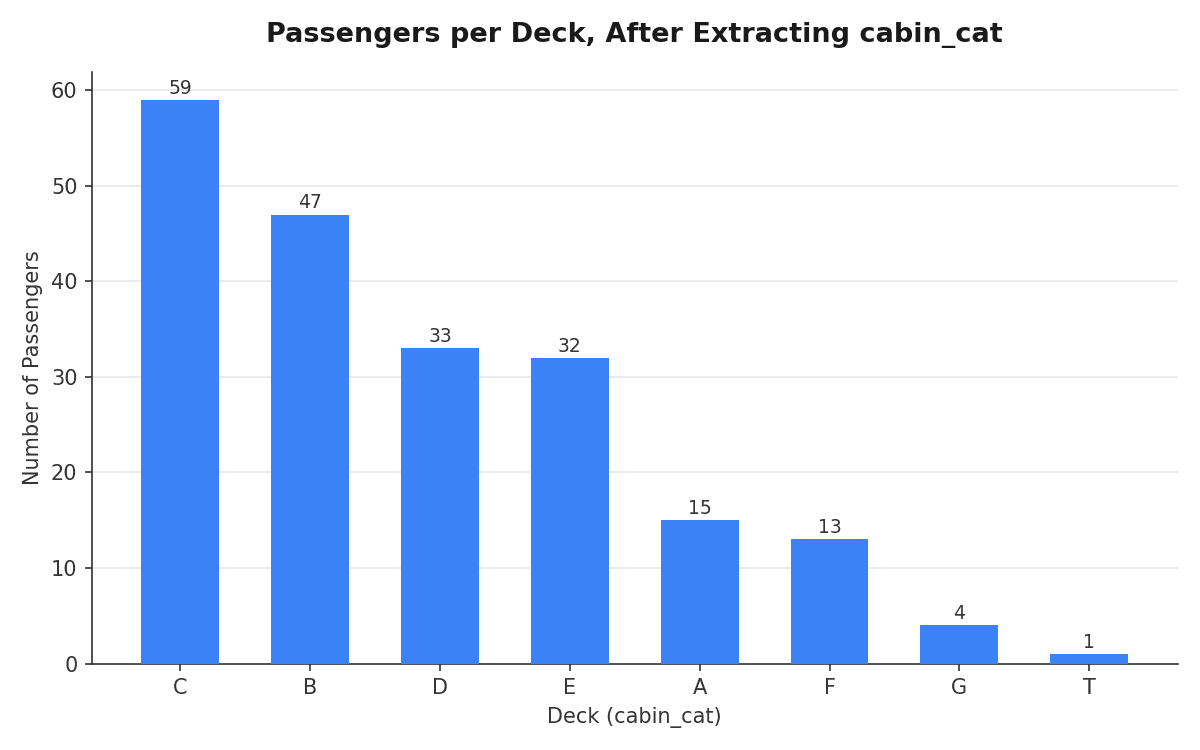
Deck C has the most passengers with a known cabin, followed by B. That's a genuinely usable categorical feature, something the raw Cabin string never gave a model a fair shot at.
Handling the Missing Values
Cabin is only populated for 204 of 891 passengers, everyone else is missing. Once split, the two new columns can be filled independently, with a strategy that fits each one:
df['cabin_num'] = df['cabin_num'].fillna(0)
df['cabin_cat'] = df['cabin_cat'].fillna('Missing')

df[['Cabin', 'cabin_num', 'cabin_cat']].sample(6, random_state=1)
Cabin cabin_num cabin_cat
862 D17 17 D
223 NaN 0 Missing
84 NaN 0 Missing
680 NaN 0 Missing
535 NaN 0 Missing
623 NaN 0 Missing0 for the missing numerical part makes sense here since no real cabin number is ever 0. For the categorical part, 'Missing' becomes its own explicit category rather than silently vanishing, so a model (and anyone reading the data later) can tell "no cabin on record" apart from an actual deck letter.
Type 2: Numbers and Categories in Different Rows
The second pattern is sneakier. The column isn't messy inside any single cell, every individual value is perfectly valid on its own. The problem is that some rows hold a number and other rows hold a category, mixed together in the same column.
To see this clearly, build one from SibSp (siblings/spouses aboard) and Parch (parents/children aboard). Adding them gives a family headcount, and instead of leaving solo travelers as 0, relabel them 'Alone', exactly the kind of thing a real dataset does to make a special case stand out:
family_count = df['SibSp'] + df['Parch']
df['number'] = family_count.astype(object)
df.loc[family_count == 0, 'number'] = 'Alone'

df['number'].value_counts()
number
Alone 537
1 161
2 102
3 29
5 22
4 15
6 12
10 7
7 6number now holds a mix of integers (1, 2, 3, ...) and the string 'Alone', all in the same column. Most passengers, 537 of them, traveled alone.
The fix: route each row into one of two new columns instead of splitting each cell. Two tools do the work, pd.to_numeric() and np.where(), so it helps to look at each on its own before combining them.
Step 1: pull out the numbers, one line at a time.
df['number_numerical'] = pd.to_numeric(df['number'], errors='coerce')pd.to_numeric() tries to convert every value in number into an actual number. Normally, if it hits something that isn't a number (like the string 'Alone'), it would throw an error and stop. errors='coerce' tells it to relax instead: whenever a value can't be converted, just put NaN there and keep going.
So for a row with number = 2, number_numerical becomes 2.0. For a row with number = 'Alone', number_numerical becomes NaN, since 'Alone' isn't a number.
Step 2: pull out the categories, using the gaps NaN left behind.
import numpy as np

df['number_categorical'] = np.where(df['number_numerical'].isnull(), df['number'], np.nan)
np.where(condition, value_if_true, value_if_false) is basically an if/else statement applied to an entire column at once, row by row. Here the three pieces are:
- condition:
df['number_numerical'].isnull(), true wherever Step 1 just filled in aNaN(meaning that row's original value wasn't a number, i.e. it was'Alone'). - value if true:
df['number'], the original value. So wherever the condition is true,number_categoricalcopies over whatever was innumber(which will be'Alone', since that's the only thing that made the condition true). - value if false:
np.nan. For every row that was a real number,number_categoricaljust getsNaN, since there's no category to record there.
Putting both steps together and sampling some rows:
df[['number', 'number_numerical', 'number_categorical']].sample(6, random_state=42) number number_numerical number_categorical
709 2 2.0 NaN
439 Alone NaN Alone
840 Alone NaN Alone
720 1 1.0 NaN
39 1 1.0 NaN
290 Alone NaN AloneRow 709 had number = 2: it became 2.0 in number_numerical, and NaN in number_categorical, since there was nothing categorical about it. Row 439 had number = 'Alone': the opposite happened, NaN in number_numerical because 'Alone' isn't a number, and 'Alone' itself carried over into number_categorical. Every row lands cleanly in exactly one of the two new columns, never both, which is the signature of this type of mixed variable.
A Harder Case: The Ticket Column
Cabin was a clean example, one letter, one number, always in that order. Real data is rarely that tidy. Titanic's Ticket column is the messier version of the same Type 1 problem:
df['Ticket'].sample(10, random_state=5).tolist()['370372', '2647', 'STON/O 2. 3101273', '1601', '8471', '693', '110152',
'347077', '111361', '315088']Some tickets are pure numbers. Others have a category prefix glued onto a number ('STON/O 2. 3101273'). There's no fixed pattern like "first letter, then digits", the prefix can be almost any length. The same two-column idea still applies, just with a slightly more careful regex.
Before looking at the full code, it helps to know what the regex pattern \d+$ actually means, since it's doing most of the work:
\dmeans "a digit" (any single character0-9).+means "one or more of whatever came right before it", so\d+means "one or more digits in a row", i.e. a whole number.$anchors the match to the end of the string. Without it,\d+would grab the first run of digits it finds, which breaks on something like'STON/O 2. 3101273'(it would stop at the2inO 2.instead of the real ticket number at the end).
So \d+$ reads as: "the run of digits sitting at the very end of the string." That's exactly the ticket number, since every ticket, whatever comes before it, always ends in the number.
With that in mind, here's what each line of the code does, one at a time, using 'STON/O 2. 3101273' as the running example:
df['ticket_num'] = df['Ticket'].str.extract(r'(\d+)$')This pulls out just that trailing number and puts it in a new column. For 'STON/O 2. 3101273', ticket_num becomes '3101273'.
ticket_cat_raw = df['Ticket'].str.replace(r'(\d+)$', '', regex=True).str.strip()This does the opposite: it finds that same trailing number and deletes it (.str.replace(..., '')), leaving whatever text came before it. .str.strip() then trims any leftover space at the end. For 'STON/O 2. 3101273', that leaves 'STON/O 2.'. For a ticket that was pure digits like '370372', deleting the number leaves nothing, an empty string ''.
df['ticket_cat'] = ticket_cat_raw.replace('', 'NONE')Those empty strings from pure-numeric tickets get relabeled 'NONE' here, so the category column always has something readable in it instead of a blank.
Running all three lines and sampling the results:
df[['Ticket', 'ticket_num', 'ticket_cat']].sample(10, random_state=5) Ticket ticket_num ticket_cat
126 370372 370372 NONE
354 2647 2647 NONE
590 STON/O 2. 3101273 3101273 STON/O 2.
509 1601 1601 NONE
769 8471 8471 NONE
545 693 693 NONE
759 110152 110152 NONE
261 347077 347077 NONE
329 111361 111361 NONE
349 315088 315088 NONERow 590 is the one worth checking by hand: 'STON/O 2. 3101273' splits into ticket_num = '3101273' (the trailing number) and ticket_cat = 'STON/O 2.' (everything before it, trimmed). Every other row here was a plain number to begin with, so it has no real prefix, ticket_num just repeats the whole value, and ticket_cat falls back to 'NONE'.
The payoff is a large drop in cardinality:
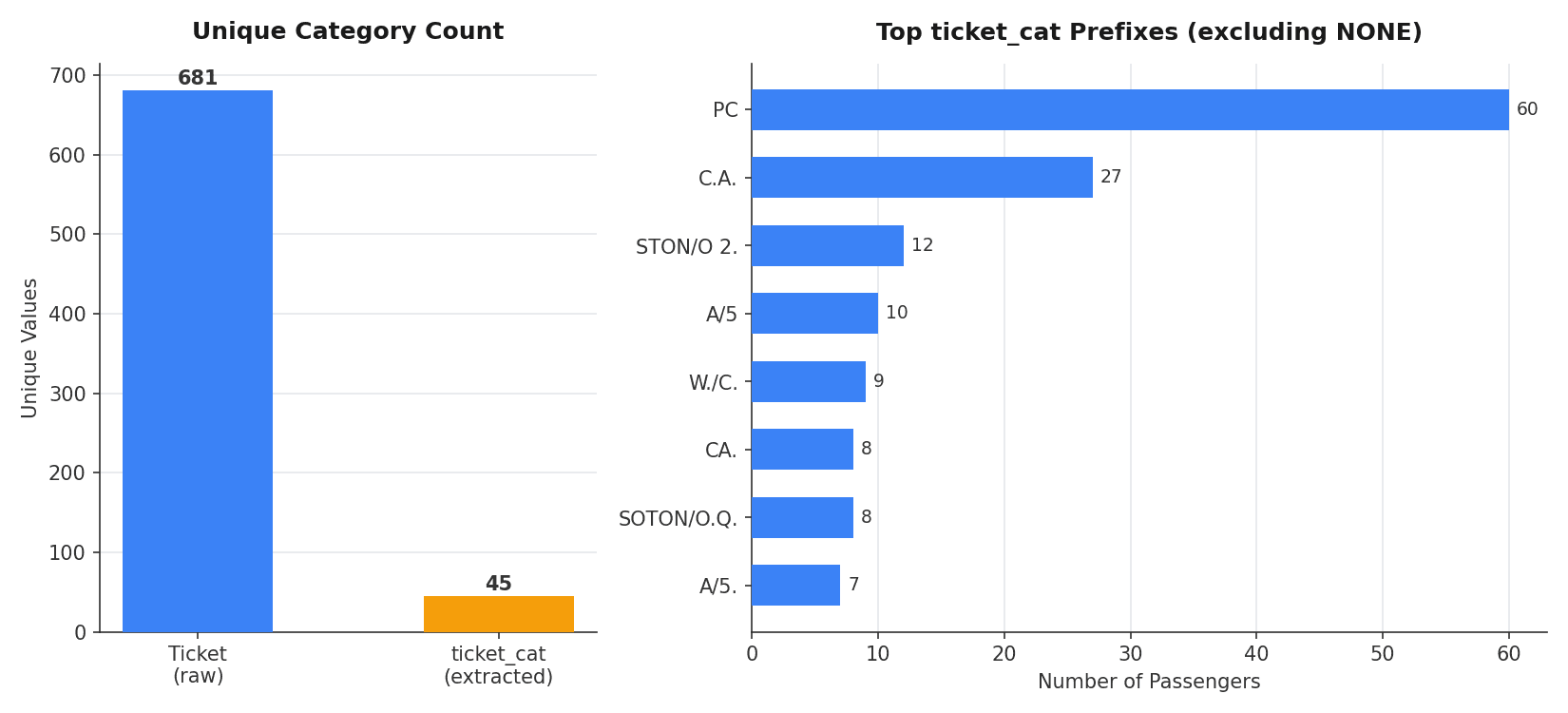
681 unique raw ticket strings collapse into 45 categories once the trailing number is stripped out, most of them (661) landing in 'NONE' because they were plain numeric tickets to begin with. PC is the largest real prefix at 60 passengers, followed by C.A. at 27. That's a column a model can actually make use of, compared to 681 near-unique strings that mostly just add noise.
Summary Cheat Sheet
| Property / Aspect | Detail |
|---|---|
| Mixed Variable | A single column holding both numerical and categorical information |
| Type 1 | Category and number combined inside the same cell (e.g. Cabin, Ticket) |
| Type 1 Fix | str.extract() / str[0] / str.replace() with regex to split one cell into two columns |
| Type 2 | Some rows are purely numeric, other rows are purely categorical, never both together |
| Type 2 Fix | pd.to_numeric(errors='coerce') for the numerical column, np.where() for the categorical one |
| Missing Values | Fill the numerical half with a sentinel like 0, the categorical half with an explicit label like 'Missing' |
| Why Bother | A high-cardinality mixed string is mostly noise; splitting it recovers a genuinely usable categorical feature plus a numerical one |
What's Next?
This post covered the two shapes a mixed variable can take, category and number fused into one cell, or category and number scattered across different rows of the same column, and the pandas tools for untangling each: regex-based string extraction for the first, pd.to_numeric plus np.where for the second. The next post in this feature engineering series moves to another everyday nuisance: handling date and time columns.