
Ch.51: Random Forest Hyperparameters
Inspired by: YouTube
Ch.48 through Ch.50 covered what random forest does and why. This one is a reference pass over its hyperparameters: what each one controls, and, for the four that actually matter most, what happens when you push them around on real data.
There's no single companion notebook for this video, it's a walkthrough of an interactive tuning tool rather than a fixed script, so the charts below come from running scikit-learn fresh, on a 2D synthetic dataset shaped to make the boundary changes visible.
1. Three Groups of Hyperparameters
RandomForestClassifier has a lot of parameters, but they split cleanly into three groups:
- Random forest's own knobs: how many trees, how much data each tree gets. Four parameters, covered below.
- Decision tree knobs, inherited: since every tree in the forest is a
DecisionTreeClassifierunder the hood,RandomForestClassifierexposes the same pruning controls,criterion,max_depth,min_samples_split,min_samples_leaf,max_leaf_nodes,min_impurity_decrease. These work exactly as they do on a standalone tree; nothing forest-specific changes about them. - General scikit-learn knobs:
n_jobs(parallelize training across CPU cores),random_state(reproducibility, since row and column sampling are both random),verbose,warm_start(train in stages as more data arrives),class_weight(for imbalanced classes),ccp_alpha(cost-complexity pruning, off by default).
The rest of this post is about group 1, the four parameters that are specific to the forest itself, not to any one tree inside it.
2. The Four Forest-Level Knobs
n_estimators(default 100): how many decision trees make up the forest.max_features: how many columns each tree is allowed to consider when picking a split. Accepts an integer (an exact column count), a float between 0 and 1 (a percentage of columns),"sqrt"(square root of the total column count, the default in current scikit-learn),"log2"(log base 2 of the column count), orNone(all columns, no restriction).bootstrap(defaultTrue): whether rows are sampled with replacement to build each tree's training subset, or whether every tree trains on the full dataset.max_samples: how many rows (as a count or a fraction) each tree's bootstrap sample draws, only meaningful whenbootstrap=True.
max_samples controls row sampling, max_features controls column sampling (Ch.48, Ch.50), and n_estimators and bootstrap sit above both.
3. More Trees: Diminishing Returns, Not a Free Lunch
A RandomForestClassifier trained on a synthetic 2-column, 2-class dataset, plotting the decision boundary at 1, 5, and 200 trees:
from sklearn.datasets import make_classification
from sklearn.model_selection import train_test_split
from sklearn.ensemble import RandomForestClassifier

X, y = make_classification(n_samples=500, n_features=2, n_redundant=0,
                            n_informative=2, n_clusters_per_class=1,
                            class_sep=1.0, flip_y=0.08, random_state=42)
X_train, X_test, y_train, y_test = train_test_split(X, y, test_size=0.25, random_state=42)

clf = RandomForestClassifier(n_estimators=200, random_state=42).fit(X_train, y_train)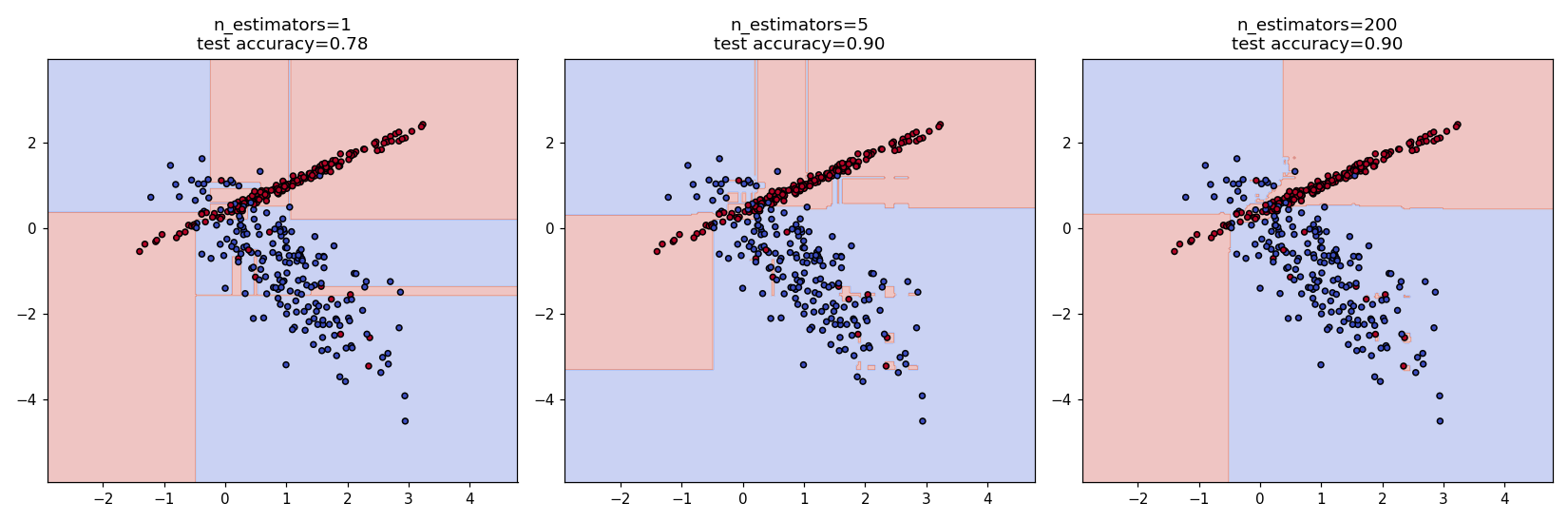
At a single tree, the boundary is exactly one tree's blocky, axis-aligned regions, test accuracy 0.78. Jumping to 5 trees already recovers most of the gain, 0.90, with a few small rectangular islands near the class boundary, the "weird areas" the video points at as a sign of overfitting from too few trees. Pushing to 200 trees does not improve accuracy further in this run (still 0.90) but smooths those islands out. This matches Ch.45's plateau argument: variance reduction from averaging keeps paying off for a while, then flattens, and n_estimators past that point costs training time for essentially no gain.
4. max_samples: a Sweet Spot, Not a Monotonic Choice
Sweeping max_samples from 5% to 100% of the training rows, with n_estimators=200 held fixed:
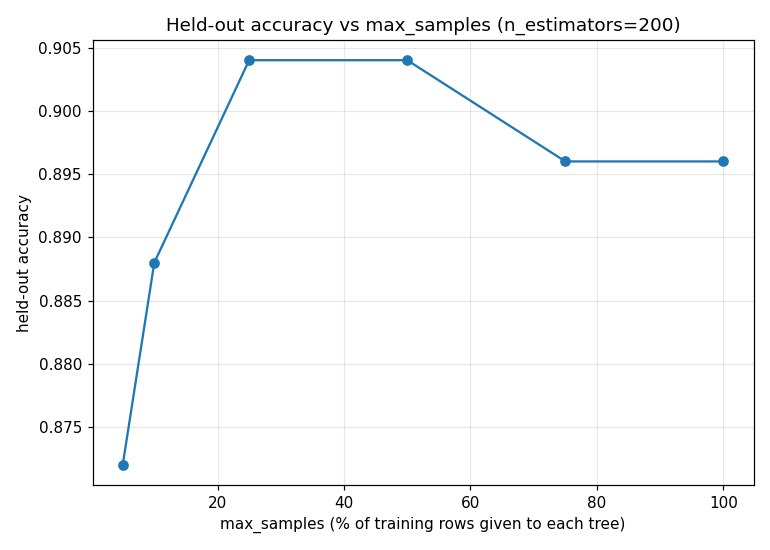
Accuracy peaks in the 25-50% range and drops slightly on either side, exactly the shape the video describes when it recommends keeping max_samples in the 50-75% range rather than pushing it to either extreme: too little data per tree (5%) starves each tree of signal, but too much (100%, no real sampling left) means every tree sees nearly the same data and the trees stop being diverse enough for averaging to help. The peak's exact location (25-50% here, versus 50-75% quoted in the video) will shift with dataset size and noise level, the point is that it's a genuine sweet spot in the middle, not "bigger subsets are always better."
5. max_features: Same Idea, One Extra Wrinkle
max_features works the same way, too few columns per split starves each tree of useful signal, too many (all columns, no restriction) makes every tree's splits converge toward the same handful of strongest columns, reducing the decorrelation that Ch.50 showed drives random forest's advantage. The one thing worth flagging explicitly: "auto" and "sqrt" are the same setting (square root of the column count), a naming leftover rather than two different behaviors, "auto" has since been deprecated in current scikit-learn versions in favor of just using "sqrt" directly.
6. bootstrap: Usually Left On
Turning bootstrap off trains every tree on the entire dataset instead of a bootstrapped subset, which removes row-sampling diversity between trees entirely (each tree still gets column sampling if max_features is set, but that's it). In practice this rarely helps and is rarely used; leaving bootstrap=True is the near-universal default.
7. What to Take Away
- Random forest's hyperparameters split into forest-level (
n_estimators,max_features,bootstrap,max_samples), tree-level (inherited fromDecisionTreeClassifier), and general scikit-learn parameters. n_estimatorshas diminishing returns: accuracy climbs fast and then plateaus, so past a certain point more trees only cost training time.max_samples(andmax_features) have a sweet spot in the middle, not a monotonic best value: too little data per tree starves it, too much makes every tree too similar to its neighbors.bootstrap=Trueis the default for a reason; turning it off removes row-sampling diversity and is rarely worth it.
Next: tuning random forest properly on a real dataset with GridSearchCV and RandomizedSearchCV, rather than nudging one slider at a time.