
Ch.31: Why HTTP/2 Is a Binary Protocol
Inspired by: YouTube
Ch.30 covered the anatomy of an HTTP/2 frame in detail: the fixed 9-byte frame header, the HEADERS and DATA frame types, the END_HEADERS and END_STREAM flags, and Wireshark traces showing real frame fields. This post takes a step back and asks a more fundamental question: why is HTTP/2 called a binary protocol, and what does that actually improve over HTTP/1.1?
The answer lies in how each protocol version gets parsed. HTTP/1.1 is a text-based protocol. HTTP/2 is a binary protocol. That distinction is not about what data they carry (both carry headers and bodies), but about how the receiving side figures out where one piece of information ends and the next begins.
How HTTP/1.1 parsing works: string traversal
Before understanding why HTTP/2's approach is better, it helps to walk through exactly what an HTTP/1.1 library does when a raw request arrives at the server. The same logic applies to responses arriving at the client, since requests and responses follow almost the same structural format (headers followed by an optional body).
A concrete HTTP/1.1 request
Consider this raw POST request:
POST /api/v1/users/signup HTTP/1.1\r\n
Host: api.example.com\r\n
Connection: keep-alive\r\n
Content-Type: application/json\r\n
Content-Length: 97\r\n
Accept-Language: en-GB\r\n
\r\n
{"name": "Ayush", "email": "ayush@example.com", "password": "s3cur3P@ss!", "plan": "premium"}
This is exactly what the server receives on the wire: one large blob of text, a continuous stream of characters. The \r\n sequences (carriage return + line feed) are literal bytes embedded in the stream, not visual line breaks added for display.
Step-by-step parsing procedure
Every HTTP/1.1 library (whether in Node.js, Python, Go, or any other language) follows the same fundamental procedure to interpret this blob:
Step 1: Read the request line.
The parser reads character by character through the string until it hits the first \r\n. Everything before that delimiter is the request line. The parser then splits this line by spaces, producing an array:
| Index | Value | Meaning |
|---|---|---|
| 0 | POST | HTTP method |
| 1 | /api/v1/users/signup | Request path |
| 2 | HTTP/1.1 | Protocol version |
The library hardcodes this convention: the first line always contains the method, path, and version, separated by spaces.
Step 2: Read headers line by line.
The parser knows that everything after the first \r\n until a double \r\n is headers. It reads character by character again, looking for the next \r\n to isolate one header line. Once it has a line, it splits by the colon (:) character:
| Line | Key (left of :) | Value (right of :) |
|---|---|---|
Host: api.example.com | Host | api.example.com |
Connection: keep-alive | Connection | keep-alive |
Content-Type: application/json | Content-Type | application/json |
Content-Length: 97 | Content-Length | 97 |
Accept-Language: en-GB | Accept-Language | en-GB |
The parser repeats this read-until-\r\n-then-split-by-colon cycle for every header line.
Step 3: Detect end of headers.
When the parser encounters a bare \r\n immediately (a blank line, meaning two consecutive \r\n\r\n sequences), it knows the headers section is over.
Step 4: Read the body.
The parser already recorded the Content-Length: 97 header during Step 2. It now reads exactly 97 bytes from the stream to obtain the request body. Without this header (or chunked transfer encoding), the parser would have no way to know where the body ends.
The same procedure applies to responses
An HTTP/1.1 response follows the same structural pattern. When a browser receives a response, it does the same thing:
- Read until the first
\r\n, split by space: index 0 is the version (HTTP/1.1), index 1 is the status code (200), index 2 is the status description (OK). - Read each subsequent line until
\r\n, split by colon to extract response headers (Server: nginx,Date: ...,Content-Type: ...). - Detect
\r\n\r\n(the double newline) to mark the end of headers. - Read the response body based on
Content-Lengthor chunked encoding.
The cost of text-based parsing
The critical insight is that this entire procedure is string traversal. The parser must scan through every character of the request or response, one by one, looking for delimiter characters (\r\n, space, colon). It then performs string split operations to extract meaningful values.
This traversal happens for every single HTTP request and response. There is no shortcut: the parser cannot jump to "the third header" without first reading through the first and second headers character by character. The cost is proportional to the size of the text.
How HTTP/2 parsing works: reading bits at fixed offsets
HTTP/2 takes an entirely different approach. Instead of sending a text blob and asking the receiver to hunt for delimiters, HTTP/2 wraps everything in frames with a fixed 9-byte binary header (covered in detail in Ch.30).
| 1st Byte (0-7) | 2nd Byte (8-15) | 3rd Byte (16-23) | 4th Byte (24-31) | ||||||||||||||||||||||||||||
|---|---|---|---|---|---|---|---|---|---|---|---|---|---|---|---|---|---|---|---|---|---|---|---|---|---|---|---|---|---|---|---|
| 0 | 1 | 2 | 3 | 4 | 5 | 6 | 7 | 8 | 9 | 10 | 11 | 12 | 13 | 14 | 15 | 16 | 17 | 18 | 19 | 20 | 21 | 22 | 23 | 24 | 25 | 26 | 27 | 28 | 29 | 30 | 31 |
| Length (24 bits) | Type (8 bits) | ||||||||||||||||||||||||||||||
| Flags (8 bits) | |||||||||||||||||||||||||||||||
| R | Stream Identifier (31 bits) | ||||||||||||||||||||||||||||||
| Frame Payload (length in bytes given by the Length field above) | |||||||||||||||||||||||||||||||
Click any field to highlight it. Length, Type, and Flags each occupy one byte; the Reserved bit (R) and Stream Identifier share the next 4 bytes; the Frame Payload follows, sized by the Length field.
The frame replaces string traversal
Recall the 9-byte frame header layout from RFC 9113 section 4.1, shown above. Every HTTP/2 frame, regardless of whether it carries headers or data, begins with these exact fields at these exact bit positions. The receiver does not need to search for any delimiter. It simply reads:
- First 24 bits → payload length (how many bytes of payload follow the 9-byte header).
- Next 8 bits → frame type (is this a HEADERS frame or a DATA frame?).
- Next 8 bits → flags (is this the end of the stream? is this the end of the headers?).
- Next 1 bit → reserved (ignored).
- Next 31 bits → stream ID (which logical request/response does this frame belong to?).
No \r\n scanning. No colon splitting. No space splitting. The server reads a fixed number of bits, interprets them based on their predefined position, and immediately knows everything it needs about the frame.
Splitting the request into frames
When an HTTP/2 client sends the same POST request from the earlier example, it does not send a single text blob. Instead, it creates two separate frames:
- HEADERS frame: Contains the request metadata (method, path, version, and all headers like Host, Content-Type, Content-Length), compressed using HPACK encoding.
- DATA frame: Contains the request body (the JSON payload).
These two frames travel independently through the network. Each one carries its own 9-byte header that tells the receiver exactly what it contains and how to handle it.
Worked example: parsing a HEADERS frame
Suppose the server receives a HEADERS frame. Here is how parsing proceeds, step by step:
Read the first 24 bits (3 bytes):
The binary value converts to decimal 15. The server now knows this frame carries a 15-byte payload.
Read the next 8 bits (1 byte):
The value is 1. The server looks up the frame type table: type 1 means HEADERS. The server now knows this frame carries HTTP headers (not body data).
Read the next 8 bits (1 byte): These are the flags. The server checks individual bits within this byte:
- Bit 0 (rightmost) is
END_STREAM. If it is1, no more frames will follow for this stream. If it is0, more frames (such as a DATA frame) are expected. - Bit 2 (third from right) is
END_HEADERS. If it is1, the complete set of headers is contained in this single frame (no CONTINUATION frames follow).
For example, if both END_STREAM and END_HEADERS are 1, the server knows this is a complete request with no body (likely a GET request). If END_HEADERS is 1 but END_STREAM is 0, the server knows that headers are complete but a DATA frame with the body will follow.
Read the next 1 bit: This is the reserved bit. The server ignores it.
Read the next 31 bits:
This is the stream identifier. The server reads, say, 1, and attributes this frame to Stream ID 1.
At this point, the server has all the metadata it needs. It knows the payload is 15 bytes of HPACK-compressed headers belonging to Stream ID 1. It reads exactly 15 bytes from the stream, decodes the HPACK data, and has the full set of HTTP headers.
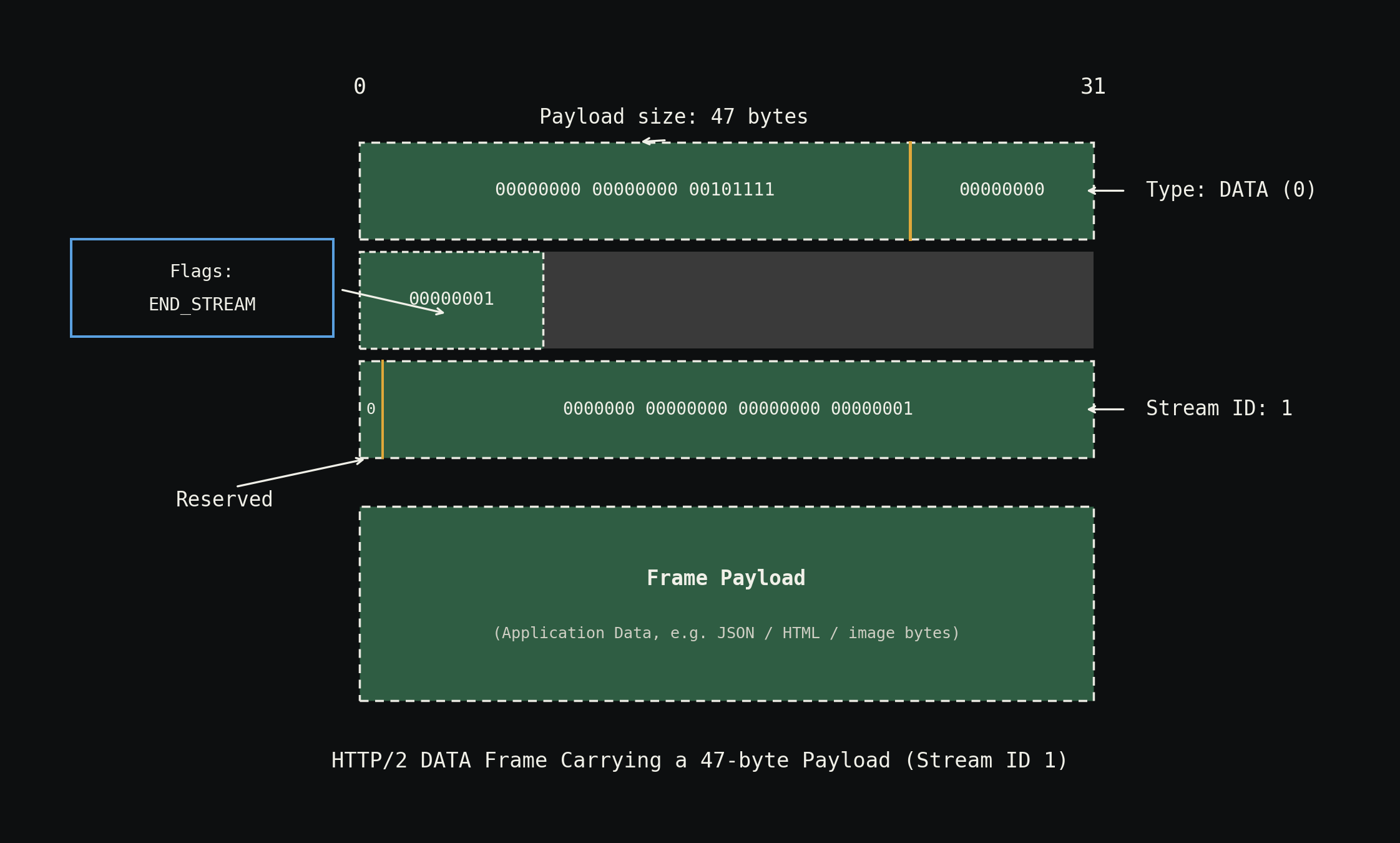
Worked example: parsing a DATA frame
The DATA frame follows the same 9-byte header format:
Read the first 24 bits:
The value is 47. The payload is 47 bytes.
Read the next 8 bits:
The value is 0. Type 0 means DATA. This frame carries application payload.
Read the next 8 bits:
The flags byte has bit 0 set to 1 (END_STREAM). This is the last frame for this stream.
Read the next 1 bit: Reserved, ignored.
Read the next 31 bits:
Stream ID is 1.
The server now knows: this is a 47-byte data payload for Stream ID 1, and it is the final frame. The server already received the HEADERS frame for Stream ID 1 earlier (the rule is that a HEADERS frame must arrive before a DATA frame for any given stream). It joins the two, and the complete request is assembled.
No string traversal anywhere
Notice what the server never did during HTTP/2 parsing:
- It never scanned for
\r\nto find line boundaries. - It never split a string by spaces to extract the method, path, and version.
- It never split a string by colons to extract header key-value pairs.
- It never looked for a double
\r\nto detect the end of headers.
It just read bits at predefined offsets. The 9-byte header is a fixed-layout binary structure where every field sits at a known position.
On the wire: a continuous stream of bits
The table-like representation of the frame header (with rows and columns for Length, Type, Flags, etc.) is purely for human readability. On the actual network wire, the frame arrives as a continuous stream of bits:
000000000000000000001111  00000001  00000101  0  0000000000000000000000000000001  [payload bytes...]
|_______ Length _______|  |_ Type_|  |_Flags_|  R  |_________ Stream ID ________|
       24 bits              8 bits    8 bits   1b          31 bits
There are no row breaks, no column dividers, no delimiter characters. The server starts from bit 0 and reads sequentially: 24 bits for length, 8 for type, 8 for flags, 1 reserved, 31 for stream ID. That is 72 bits (9 bytes) of header, followed by exactly as many payload bytes as the Length field specified.
This is fundamentally different from HTTP/1.1, where the parser has no idea how many characters to read until it finds the next \r\n.
Why binary parsing is more efficient
The efficiency advantage boils down to one principle: computers are more efficient at reading bits at fixed offsets than at traversing strings looking for delimiters.
| Aspect | HTTP/1.1 (text-based) | HTTP/2 (binary) |
|---|---|---|
| Parsing strategy | Scan string character by character for \r\n, then split by space or colon | Read N bits at a known offset, interpret as integer or flag |
| Finding the method | Read until first \r\n, split by space, take index 0 | Read the HEADERS frame type field (bits 24–31), then decode HPACK payload |
| Finding the body length | Traverse all headers until Content-Length is found, parse its string value | Read bits 0–23 of the DATA frame header |
| Detecting end of headers | Scan for \r\n\r\n (double newline) | Check the END_HEADERS flag bit (bit 2 of the flags byte) |
| Detecting end of request | Implicit (read Content-Length bytes, or detect chunked encoding terminator) | Check the END_STREAM flag bit (bit 0 of the flags byte) |
| Per-request cost | Proportional to the text size of headers + delimiters | Fixed 9 bytes of header parsing per frame |
With HTTP/1.1, the parser must do this string traversal for every request and every response. With HTTP/2, reading 9 bytes of fixed-format binary data tells the parser everything it needs to know about the frame before it even touches the payload.
This is the "binary framing layer" that HTTP/2 introduces. It replaces HTTP/1.1's text-based parsing model entirely, and it is the reason HTTP/2 is called a binary protocol.
Summary
- HTTP/1.1 is a text-based protocol. The server receives each request as a large blob of text and must traverse it character by character, looking for
\r\ndelimiters to isolate lines, splitting by space on the first line (to get method, path, version), and splitting by colon on subsequent lines (to get header key-value pairs). A double\r\nsignals the end of headers, after which the body is read based onContent-Length. This same procedure applies to responses as well. - HTTP/2 is a binary protocol. Instead of a text blob, every piece of data is wrapped in a frame with a fixed 9-byte binary header. The server reads 24 bits for payload length, 8 bits for frame type, 8 bits for flags, 1 reserved bit, and 31 bits for stream ID, all at predefined offsets with no delimiter scanning.
- Frames eliminate string traversal. The server never needs to scan for
\r\n, split by space, or split by colon. It reads bits at fixed positions and immediately knows what the frame contains, how large its payload is, whether more frames follow, and which stream it belongs to. - The HEADERS frame tells the server that its payload is HPACK-compressed header data, and the DATA frame tells the server that its payload is raw application data. The type field (bits 24–31) makes this distinction in a single byte read.
- Flags provide instant state information.
END_HEADERS(bit 2) andEND_STREAM(bit 0) in the flags byte tell the server whether to expect more header fragments or more data frames, without scanning ahead. - A DATA frame for a given stream ID must always arrive after the HEADERS frame for that stream. The server uses the stream ID and flags from earlier frames to know that an incoming DATA frame completes a request whose headers were already received.
- Computers are more efficient with bits than with strings. Reading fixed-width binary fields is cheaper than traversing variable-length text and performing string split operations. This efficiency gain, multiplied across every request and response, is the core improvement HTTP/2's binary framing layer provides over HTTP/1.1's text-based parsing.